Reviews
Glean Review - The Enterprise AI Platform Built On Your Own Data
We've tested Glean, the enterprise AI platform that connects to your company's internal apps so search, assistants, and agents all run on your own data.
We've tested the Instagram Transcript Generator, a free tool that turns any public Reel into a full text transcript without an account.
Welcome to this Instagram Transcript Generator (by TransClipper) review ✨
There's a specific kind of annoying that comes from watching a Reel you want to study. Someone in your niche posted a 45-second video that did 800k views, and you want to know what they actually said: the exact words, the order they came in, where the turn happened. So you watch it. Then you watch it again with your thumb on the scrubber. Then you start typing it out by hand, and somewhere around second twelve you give up and tell yourself you got the gist.
Getting an Instagram reel transcript should be a ten-second job, and mostly it isn't. Half the tools that promise it want an account before they'll show you a single word. The other half quietly read Instagram's auto-caption overlay, which means they only work on videos where the creator bothered to turn captions on, and when they do work, they inherit every mistake Instagram made.
This tool takes the boring, correct approach: paste a link, it pulls the audio, it transcribes the audio, you get the words. No account. I ran three real Reels and clips through it, in two languages, until I hit the daily ceiling. Which I did, and I'll tell you exactly what that looks like.
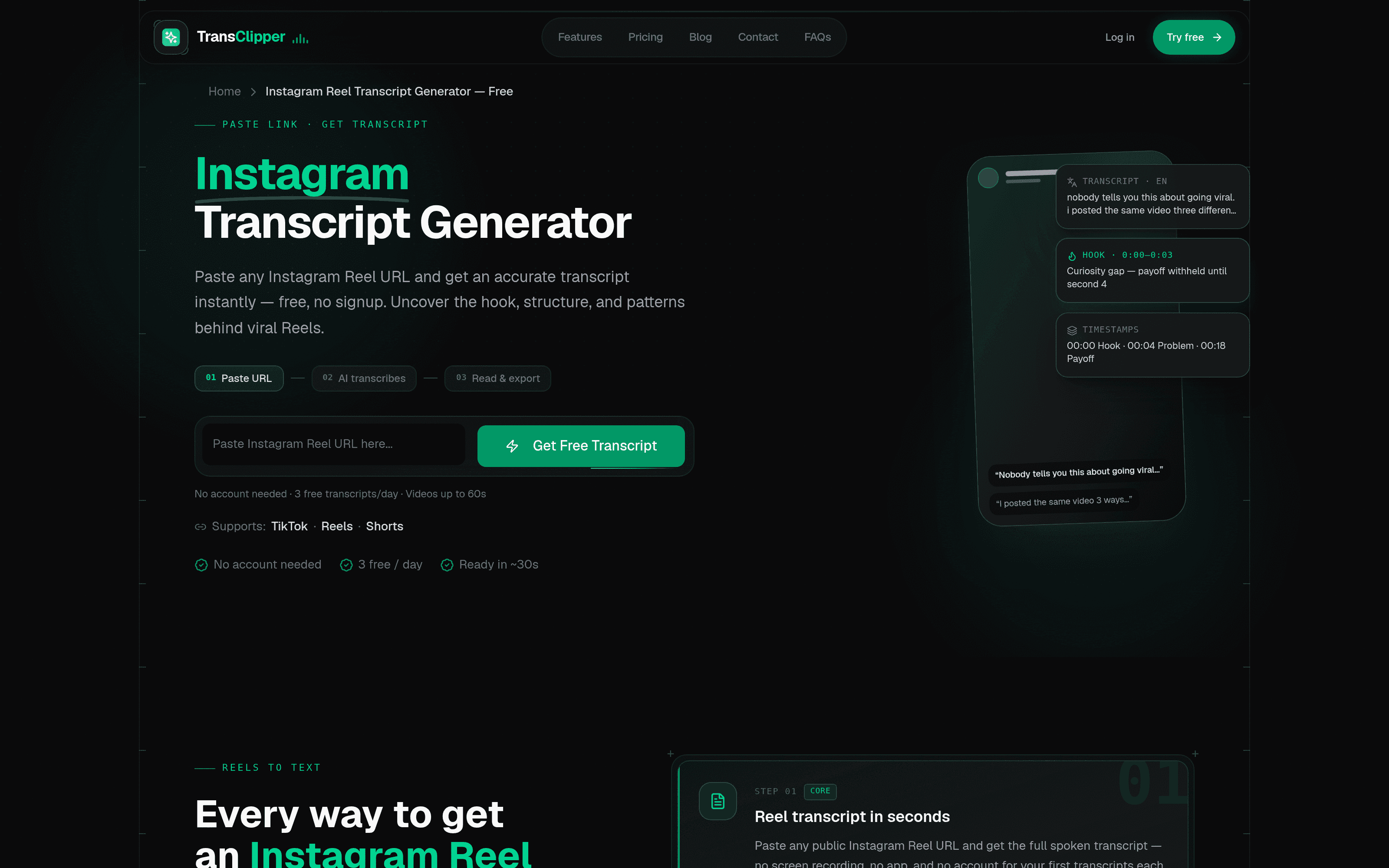
There is no onboarding here, which is the point. The page is a URL field and a green button that says Get Free Transcript. Underneath it, in small grey text: No account needed · 3 free transcripts/day · Videos up to 60s. That's the whole contract, stated before you commit anything.
I pasted a GaryVee Reel and clicked. The page moved to a result URL and showed a spinner with "Transcribing your video… This usually takes 10–30 seconds. Don't close this page." It was still spinning at five seconds and finished inside twenty-three. The other two runs landed in the same window. The "~30s" claim on the homepage is honest, which is rarer than it should be.
What you land on is a result page with the Reel's caption as a headline, the creator's handle underneath, and the transcript in a card with a Copy button. That's it. No dashboard, no email capture, no "check your inbox."
This is the claim worth actually testing, because it's the one that separates a real transcription tool from a caption scraper. The Reel I picked settles it neatly by accident.
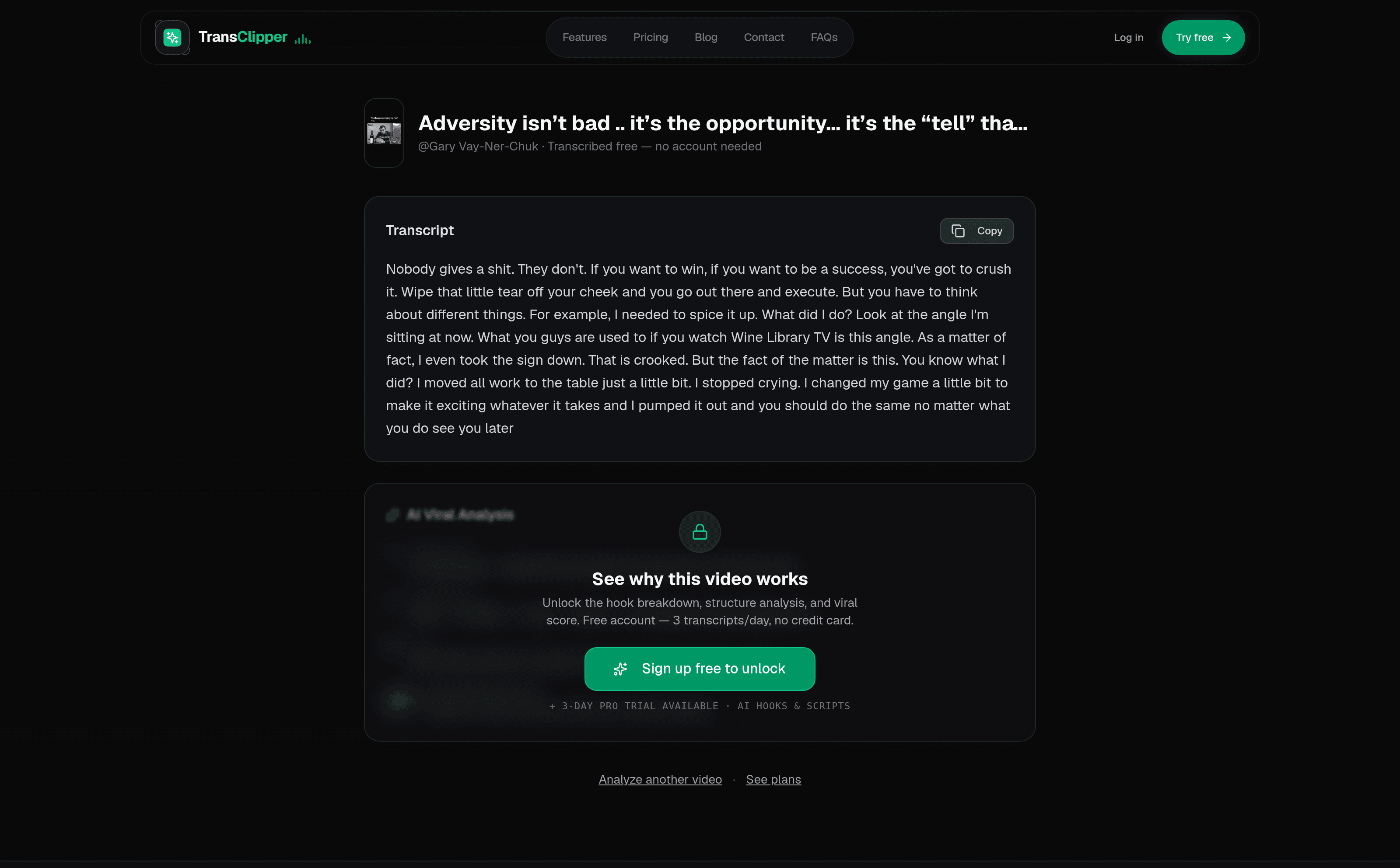
Its Instagram caption reads "Adversity isn't bad .. it's the opportunity… it's the 'tell' that you need a change or have to adjust." The audio is something else entirely: an old Wine Library TV clip where he's talking about camera angles and taking a sign down. The transcript that came back was the audio, word for word. "Wipe that little tear off your cheek and you go out there and execute… Look at the angle I'm sitting at now. What you guys are used to if you watch Wine Library TV is this angle." Not one sentence of the caption made it in.
If the tool were reading the overlay or the caption field, it would have handed me a paragraph about adversity. It handed me the speech. That's the difference between a tool that can transcribe an Instagram reel and one that can only reformat what Instagram already gave it, and it means caption-less Reels, still most of them, turn into text just fine.
I ran a French Reel next, a Konbini interview clip: fast conversational French, two people talking over each other. There is no language selector anywhere on the page, and I didn't need one. It came back in French, correctly, opening on "Tu te souviens du moment où t'as compris comment se faisaient les bébés ?"
Two people interrupting each other in colloquial French is a genuinely hard case, and it handled the overlap without dropping either speaker. What it doesn't do is label who's talking. There's no diarisation, so a two-person interview comes back as one continuous block of text. For studying a hook or a structure that's fine. For anything where you need to know who said what, you'll be doing that pass yourself.

The Instagram page is one of three doors into the same engine. TransClipper also runs a free TikTok transcript generator and a YouTube Shorts transcript generator, and the URL field on each accepts links from all three platforms regardless of which page you're on. The placeholder text changes, the behaviour doesn't.
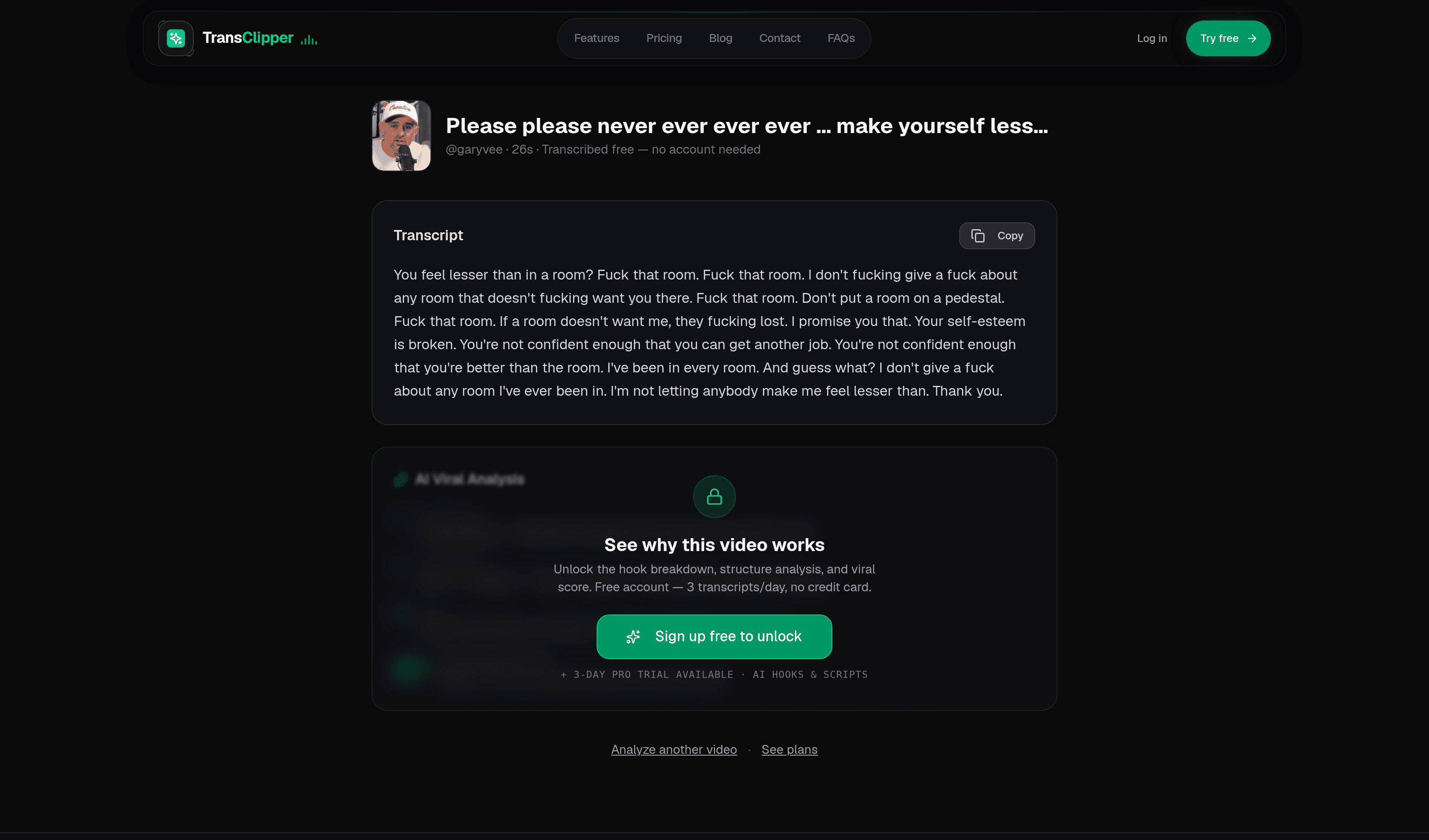
I spent my third free run on a TikTok, and it's worth mentioning what came back because it tells you something about the transcription policy. The clip is 26 seconds of GaryVee swearing at a hypothetical room, and the transcript kept every expletive exactly where it fell. Nothing was bleeped, softened or dropped. If you're mining hooks, that's what you want, because the profanity often is the hook.
One small difference between platforms: the TikTok result printed the clip's duration next to the handle (26s), and neither of my Instagram results did. It doesn't affect the transcript, but it's the kind of rough edge that tells you which platform got built first.
Three free transcripts a day, and the counter is global, not three per platform. I used two on Reels and one on a TikTok, then tried a YouTube Short and got a modal instead of a transcript:
You've used today's free transcripts. Upgrade for unlimited transcripts (fair use), or buy credits to keep going.
One credit, it adds, covers a video under five minutes. Two buttons sit below: Try Pro free for 3 days and Buy credits instead. It's a clean wall, with no dark pattern and no pretending to work and failing. But it does mean I never got to run a Short through the YouTube tool, so I can't vouch for that one from experience the way I can for the other two.
There's also a "Quick URL Method" advertised on the feature list, where you prefix any video link with the domain and get the transcript instantly. I tried it and got redirected to a sign-in screen, so that particular shortcut is an account feature, not part of the no-signup path.
One small thing worth flagging: the tool page's own feature list still claims you get "5 a day with a free account," while the pricing card directly below it, the pricing page, and the unlock button on the result page all say 3. Everything says 3 except one line of marketing copy, so I'd plan on 3.
Everything above is the free, anonymous surface. Behind an account there's a fair bit more, none of which I tested, since I reviewed the free tool and that's the thing being launched:
I do want to be straight about one thing on the free result page. Below the transcript there's a panel headed AI Viral Analysis, showing hook type, structure, CTA and a big "87 viral potential score," all sitting behind a blur and a lock with a Sign up free to unlock button. It reads like your video's analysis, waiting for you. It isn't. I checked the text underneath the blur on all three of my videos and it was byte-identical every time: same hook type, same five-beat structure, same 87. It's the marketing mockup from the homepage, reused as a teaser. The gate itself is fair enough, since the analysis is a paid feature, but dressing a static placeholder as a result you've already earned is the one thing on this page that isn't playing straight.
Free is genuinely free: three transcripts a day, videos up to 60 seconds, no card. That's enough to study a competitor's best post every morning, and for a lot of people it's the whole use case.
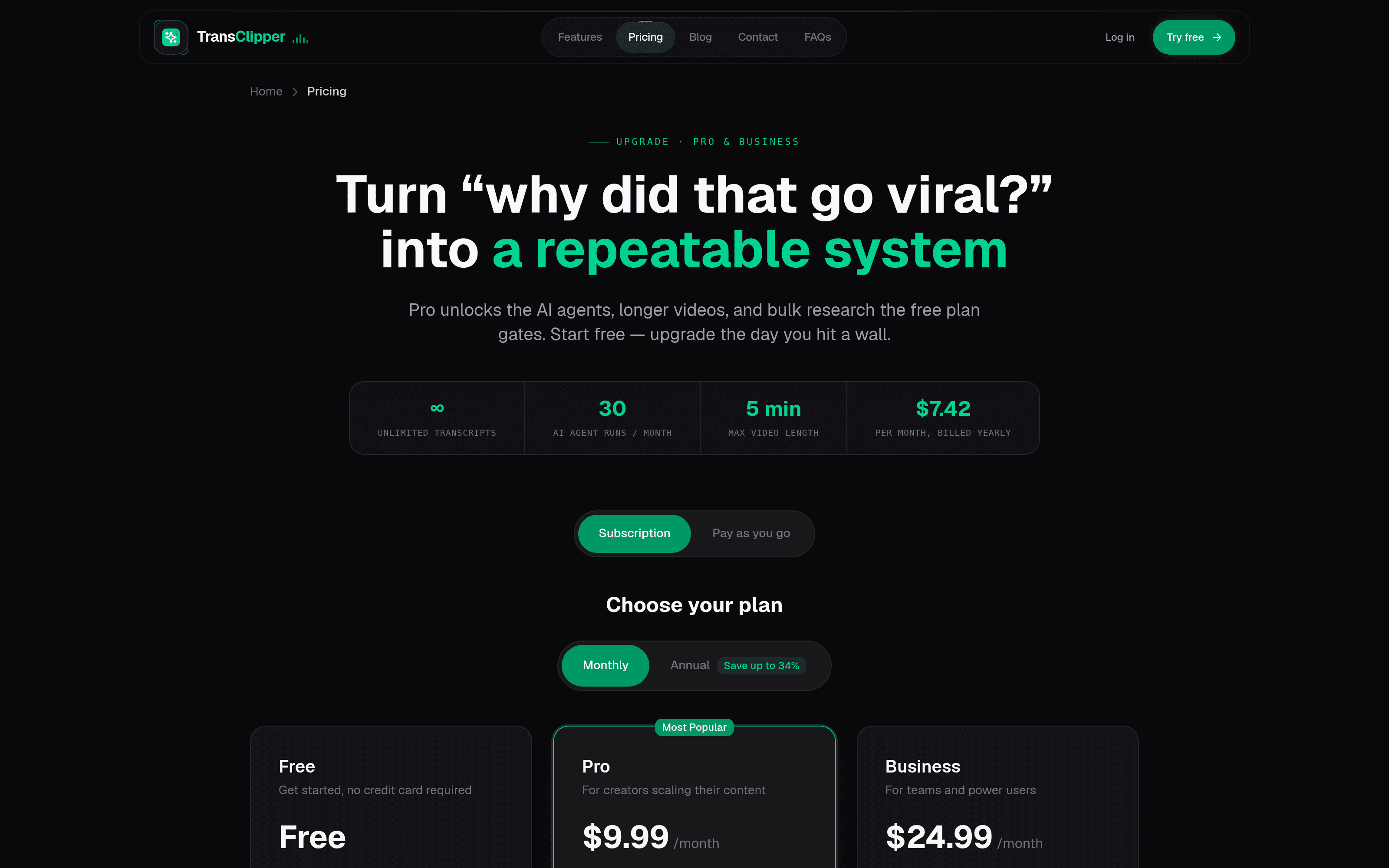
Pro is $9.99/month, or $89/year ($7.42/month) if you pay annually, a 26% saving. Either way you get unlimited transcripts (fair use), videos up to 5 minutes, unlimited translations, bulk import of 50 videos, HD watermark-free downloads, 30 AI agent runs a month, 500 API requests and priority support. The feature list is identical on both billing periods; only the price moves.
Business is $24.99/month or $199/year ($16.58/month), a 34% saving. It raises the video ceiling to 10 minutes, the agent runs to 100 a month and the API to 1,500 requests, and it's the only tier with the shared team workspace. If you're one person, Pro is the plan; Business is priced for a team that needs the shared library.
Pro has a 3-day free trial: $0 today, cancel before day three, Stripe checkout. There's also a Pay as you go tab on the pricing page if a subscription is overkill, offering credits instead of a plan, where one credit covers a video under five minutes. That's a sensible option for someone who hits the free wall twice a month rather than twice a day.
One caveat: these plans moved while I was writing this review. The pricing page was restructured mid-test, and the monthly tiers changed from capped transcript counts to unlimited. The numbers above are what I saw on the day. Check them yourself before you buy rather than trusting mine or anyone else's.
Who shouldn't bother: the free output is one unbroken block of text with no speaker labels and no timestamps, so if you need editorial-grade transcription of long multi-person interviews, this isn't that tool and doesn't claim to be. It's built for short-form, capped at 60 seconds free, 5 minutes on Pro and 10 on Business. And if you already have a workflow that gets you transcripts, the thing being sold here is the removal of friction, not a capability you lack. Whether that's worth $89 a year depends entirely on how many times a week you hit that friction.
Do I need an account to transcribe an Instagram Reel?
No. The free flow needs nothing: no email, no password, no card. You paste a public Reel link, click Get Free Transcript, and read the words. The only thing that asks for an account is the "Quick URL Method" shortcut, which despite sitting on the no-signup page redirects you to sign in.
How many free transcripts do I get per day?
Three, and the counter is global rather than three per platform. I used two on Reels and one on a TikTok, then hit the wall on my fourth attempt. One line of old marketing copy still promises "5 a day with a free account," but the pricing card, the pricing page and the result-page unlock button all say 3, so plan on 3.
Does it transcribe the audio or just copy Instagram's captions?
It transcribes the audio. I proved this on the first Reel: its Instagram caption was about "adversity," but the spoken audio was an old Wine Library TV clip about camera angles, and the transcript came back word for word as the speech, with not one sentence of the caption. That means caption-less Reels, still most of them, turn into text just fine.
Does it work on TikTok and YouTube Shorts too?
Yes. The Instagram page is one of three doors into the same engine, and the URL field accepts links from all three platforms regardless of which page you are on. I ran a TikTok through it successfully. I never got to test a YouTube Short because I hit the daily limit first, so I can only vouch for Reels and TikTok from experience.
What languages does it support, and do I have to pick one?
There is no language selector, and you do not need one. It auto-detects the spoken language. I ran a French Konbini interview clip with two people talking over each other, and it came back correct French without dropping either speaker.
Does the transcript include speaker labels or timestamps?
No. There is no diarisation and no timestamps, so a two-person interview arrives as one continuous block of text. For studying a hook or a structure that is fine. For anything where you need to know who said what, you will be doing that pass yourself.
How long can the videos be?
Free is capped at 60-second videos. Pro raises the ceiling to 5 minutes and Business to 10 minutes.
How much does the paid version cost?
Pro is $9.99/month, or $89/year ($7.42/month) annually. Business is $24.99/month or $199/year ($16.58/month). Pro has a 3-day free trial, and there is a Pay as you go option where one credit covers a video under five minutes. Note that pricing was actively changing during my testing, so verify the current numbers before you buy.
The Instagram Transcript Generator (transclipper.ai) does the one thing it advertises, quickly, without asking you for anything first. I pasted three links and got three accurate transcripts in two languages, each inside thirty seconds, and the tool proved on the very first video that it's listening to the audio rather than scraping a caption. For a free tool with no account wall, that's a strong showing.
The friction is all around the edges rather than in the product: a stale "5 a day" line in the marketing copy, a shortcut advertised on a no-signup page that turns out to need a signup, and a blurred "analysis" panel that promises something more personal than it delivers. None of it breaks the transcript. All of it would take an afternoon to fix.
What I liked:
Things to keep in mind:
If you study short-form for a living, go paste a link into the Instagram Transcript Generator. You'll know within thirty seconds whether it belongs in your workflow.
Glean Review - The Enterprise AI Platform Built On Your Own Data
We've tested Glean, the enterprise AI platform that connects to your company's internal apps so search, assistants, and agents all run on your own data.
Postiv AI Review - A Content System, Not a Post Generator
We've tested Postiv AI, a LinkedIn content system that turns your pillars into a weekly plan, drafts and carousels, and feeds performance back into next week's briefs.